
TEMPLATES
Digital menu board templates
Start with a professionally designed template, add your menu and branding, and MenuScreen turns it into a ready-to-use digital menu board. No design skills or design software required.
14-day free trial. No credit card required.
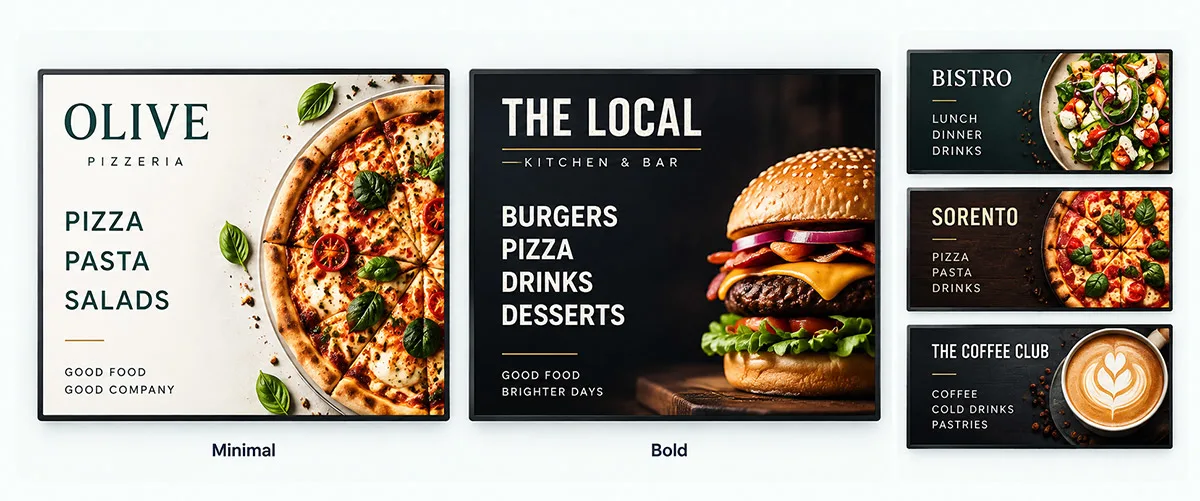
TEMPLATE STYLES
Pick the style that fits your restaurant
Every MenuScreen template is built for a 16:9 menu screen and adapts to your content. Choose the style that matches your brand, then make it yours.
Minimal
Refined editorial typography that adapts to your content. A calm, premium look that suits pizzerias, bistros, bakeries and cafés.
Bold
Accent category bars and bold price pills for busy counters. Made for burger bars, fast food and takeaways where customers need to decide quickly.
Chalkboard
A hand-chalked board in a wooden frame, with chalk-yellow headings. Made for cafés, bakeries and pubs.
Night
Dark and elegant with gold details and a thin gold frame. Made for cocktail bars, wine bars and fine dining.
Fresh
Light, green and airy cards. Made for salad bars, juice bars and healthy food.
Street
High-contrast black and yellow with a hazard stripe. Made for food trucks, burgers and late-night food.
Showcase
Every dish as a photo card with name, short description and price. Add a photo to each dish and let the pictures sell. Made for counters where customers choose with their eyes: ice cream, bakeries and fast casual.

MAKE IT YOURS
Customize any template in minutes
Your logo
Add your logo so every screen looks like your restaurant.
Your colors and fonts
Match your brand colors and typography in a few clicks.
Food backgrounds
Choose from a library of 86 food and drink photos in 16 categories, or upload your own.
Made for 16:9
Every layout is designed to be readable on a landscape TV screen.
BY BUSINESS TYPE
Menu board templates for every food business
The same templates work for any kind of menu. Here is how restaurants typically use them.
Pizza menu board
Show pizzas, sizes, toppings and deals. The Minimal style gives a classic pizzeria feel, while Bold makes meal deals stand out.
Coffee shop menu board
List drinks, sizes and add-ons next to pastries and breakfast. Minimal keeps a long drinks list calm and easy to read.
Fast food menu board
Highlight burgers, combos and sides. Bold category bars and price pills help customers find what they want at the counter.
Bakery, bar and food truck menu boards
From daily bakes to drink lists and street food, both styles handle menus that change every day. There are also layouts for ice cream shops, happy hour and menus with allergen labels.
What makes a good digital menu board template?
A good template is readable from across the room, not just pretty up close. Look for large prices aligned in one column, clear category headings, high contrast between text and background, and enough empty space that the eye can find a dish in a few seconds. Our menu board font size calculator shows how large the text needs to be for your viewing distance.
MORE THAN A TEMPLATE
A digital menu board maker, not a static design
Most menu board templates are static designs. Every time a price changes, you open a design tool, edit the text by hand and export a new image for your screen.
MenuScreen templates are connected to your menu. When you add a dish, change a price or create a new category, the layout updates itself and the screen shows the new version automatically. If your menu grows beyond one screen, MenuScreen adds pages in the same design.
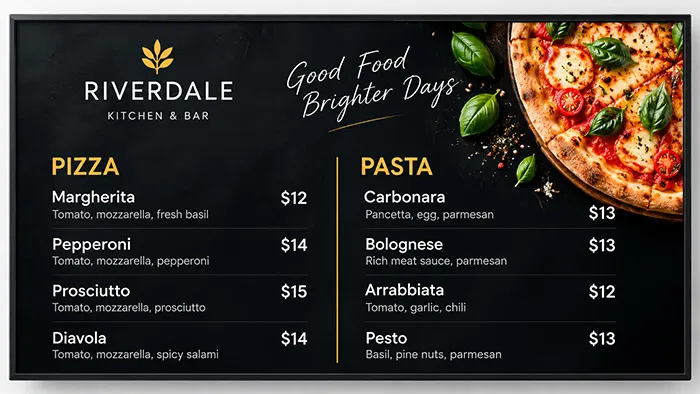
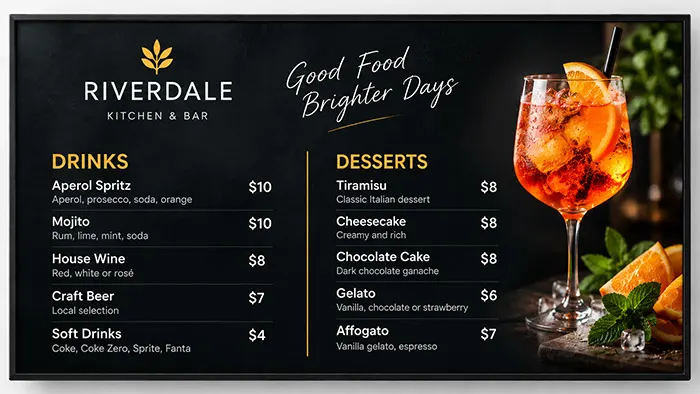
HOW IT WORKS
From template to menu board in three steps
1. Choose a template
Pick one of seven templates as the starting point for your menu board. You can switch at any time without retyping anything.
2. Add your menu
Enter categories, items, descriptions and prices. Add your logo and colors.
3. Put it on screen
Connect your TV by scanning its QR code with your phone or typing a 6-digit code, or add a direct link to a digital signage player. See how to use a TV as a menu board.
FAQ
Template questions
Are the templates free to use?
Yes. All templates are included in every MenuScreen plan and in the 14-day free trial. There are no premium templates or extra fees.
Can I customize a template?
Yes. Add your logo, choose your colors and typography, and pick a restaurant background or upload your own image. MenuScreen keeps the layout clean while you make it match your brand.
What size are the templates?
All MenuScreen templates are made for landscape 16:9 screens, the standard format for TVs and most commercial displays.
Do I need design software?
No. You add your menu items and prices in MenuScreen, and the template arranges everything for you. There is nothing to download or install.
What happens if my menu does not fit on one screen?
MenuScreen automatically splits larger menus into multiple pages that use the same template, so every page stays readable and consistent.
Where can I find free digital menu board templates?
Design tools offer free static templates that you edit and export as an image. MenuScreen templates are included in every plan and free to try for 14 days, and they stay connected to your menu, so prices and dishes update on the screen without redesigning anything.
Try every template free for 14 days
Create your digital menu board in minutes. No credit card required. See pricing.